How to Create an Ebook on Ravelry
Step by Step Guide
This step by step tutorial is meant for Crochet Pattern Designers. If you've been designing crochet patterns and want to sell them online, Raverly is a great place to start.
You don't need a website. All you need to do is create a PDF of your crochet pattern after you've designed and tested it, of course, then upload the pattern to Ravelry.
Once you have a few patterns (minimum 3 I'd say related to a certain theme), you can combine them into an ebook and sell them as a bundle for a discounted price.
People usually like buying crochet patterns in bulk. It saves them money and gives them several options to choose from.
Subscribe To My Designer Newsletter
Would you like me to send you more tutorials, templates, & helpful tips & tricks for new crochet designers? Please enter your Name & Email below 🙂
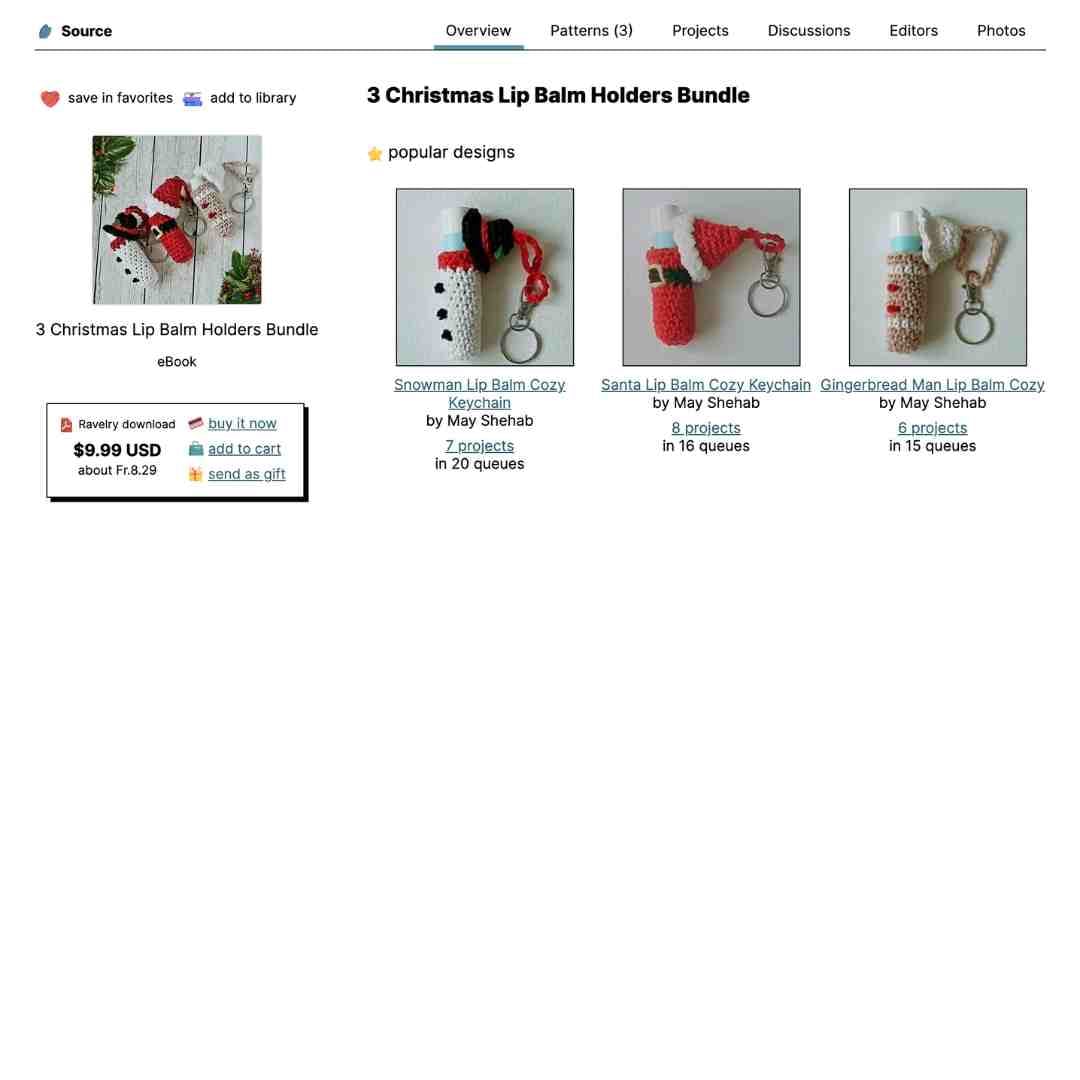
I personally like to design patterns in sets of 3 that are related somehow. Let's say it's Christmas time and I create a lip balm holder pattern, I then design a couple more to create a set. Here's an example of my 3 Christmas Lip Balm Holder Crochet Patterns.

Once you have a set of patterns, you can bundle them up and create an ebook on Ravelry.
What Is an Ebook on Ravelry
An ebook on Ravelry is one digital PDF that includes several related patterns bundled together.
Instead of buying each pattern separately, customers buy one ebook and get a whole collection in one place.
This doesn't have to be an elaborate design. You could simply create one or two pages and add all the titles and links to your patterns for people to access.
I use Ravelry ebooks to group patterns that belong together, whether that is a matching set, a seasonal collection, or designs that use the same techniques.
Once someone buys the ebook, it shows up in their Ravelry library, and if I update the ebook later on, those updates are automatically sent to everyone who has purchased it.
Ebook vs Pattern Bundle on Ravelry
On Ravelry, an ebook and a pattern bundle might sound similar, but they work quite differently.
A pattern bundle is made up of separate pattern PDFs that are linked together, so customers receive multiple individual files when they purchase it.
An ebook, on the other hand, is one single PDF that contains all the patterns combined into one document. This can either be
1. designed as one long PDF document with all the patterns included as pages of this ebook,
2. or you could simply design one page with links to the included patterns.
I like to think of bundles as a flexible option when patterns already exist as standalone products, while ebooks feel more polished and cohesive, especially for collections that are meant to be used together.
Choosing between the two really comes down to how you want the patterns delivered and how you want customers to experience the collection.

Why Create an Ebook on Ravelry
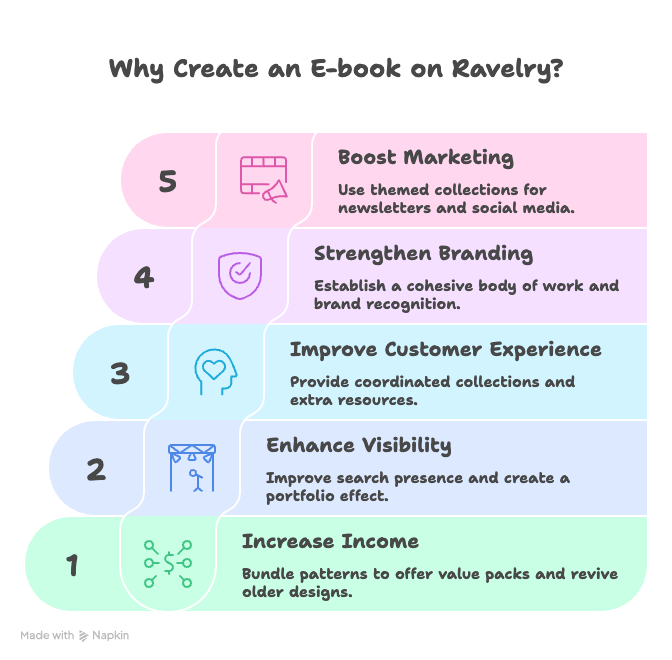
There are several advantages to going through the trouble of creating an ebook on Ravelry. You need to understand that creating an ebook on Ravelry can strengthen your income, visibility, and customer experience. Let me explain exactly how this happens:
Income and sales potential
Bundling patterns in an ebook lets you as designer offer attractive “value packs” at a higher overall price. This way, you're still giving customers a discount compared to buying patterns individually.
When you do this, you can increase average order value and make promotions (like launch sales or seasonal bundles) easier to run.
An ebook also gives older patterns a new life by packaging them together, which can generate passive income from designs that might not sell much on their own.
Visibility and discoverability
Ravelry’s advanced search tools and huge user base mean that an ebook appears alongside individual patterns, helping more makers discover your work in one place.
A well-presented ebook (good photos, clear description, focused theme) can act as a “portfolio” that introduces new customers to your overall style and encourages them to explore the rest of your catalog.
Better customer experience
Many customers like having a coordinated collection in a single PDF instead of multiple files scattered in their library, which makes printing or using on a tablet much easier.
An ebook can also include extras such as sizing tables, technique photo tutorials, notes on yarn substitutions, or styling suggestions, that are harder to justify in a single small pattern.
Branding and professionalism
Publishing an ebook signals that you as the designer have a cohesive body of work and that you're serious about your brand.
Consistent layout, photography, and voice across a collection builds brand recognition and trust, making it more likely that crocheters will return for future releases and follow you on social media or email list.
Marketing advantages
An ebook gives clear, compelling content to promote in newsletters, on Pinterest, and in social posts, especially when it has a strong theme (e.g., “Quick Gifts,” “Scrap Yarn Projects,” “Beginner Basics”).
Want to post to all your social media very quickly? Check out Blotato.
It also opens opportunities for collaborations (like collective ebooks with other designers or cross-promotions) and for limited-time offers that create urgency, like launch windows or seasonal bundles.
How To Create An Ebook on Ravelry Step by Step
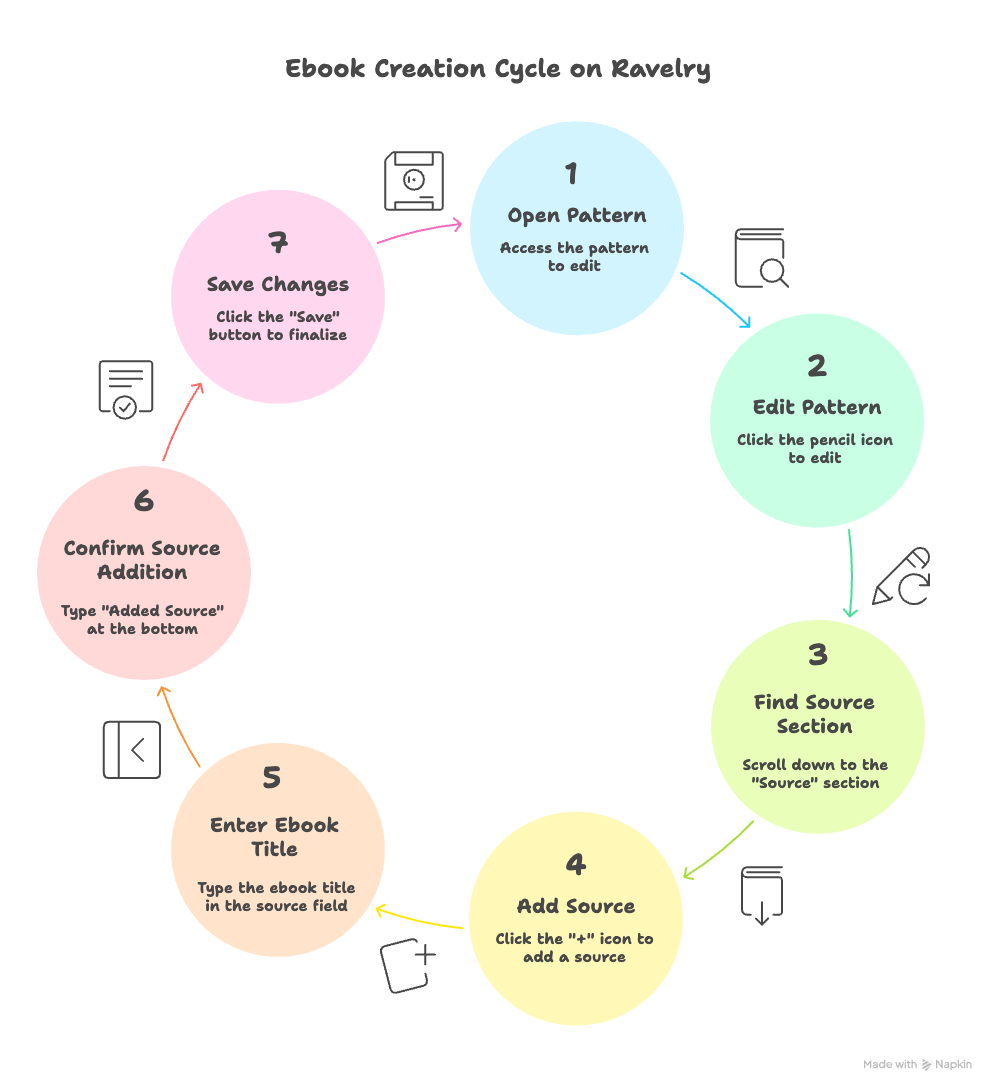
Let me explain this graphic I made for you:
First, you need to have existing patterns in your Ravelry Account. I'm assuming you already have that.
Once you’ve decided on which of your patterns you’d like to bundle up into an e-book, go to each one of these patterns and follow these steps:
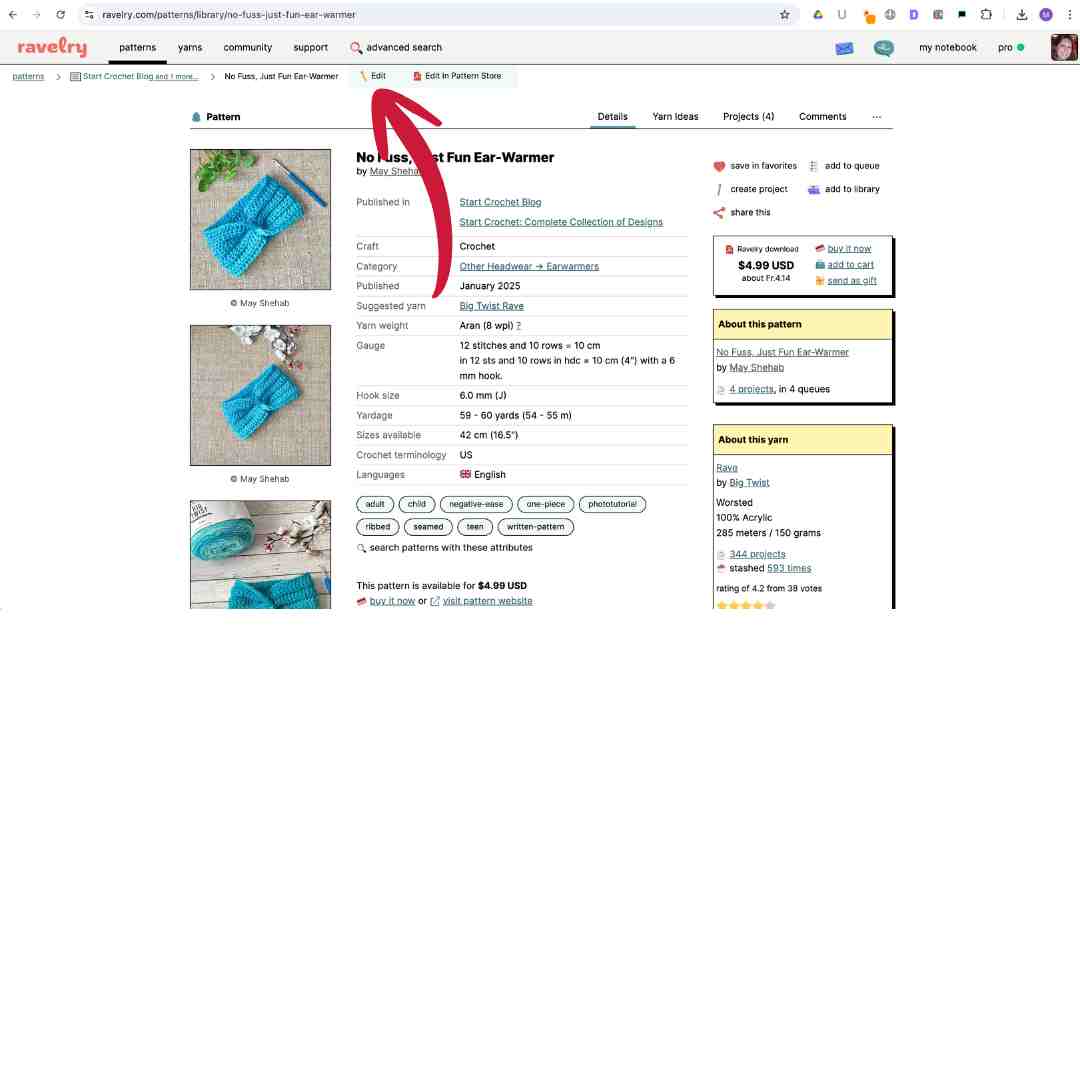
1. Open the pattern
2. Click on the pencil icon on the top left to edit the pattern
3. Scroll down to where it says “Source”
4. Click on the + icon to “Add Source”

5. Type the Title of your e-book (copy the title so you can simply paste it in your other patterns to include in this e-book)
6. Scroll down to the bottom and type “Added Source”
7. Click “Save”
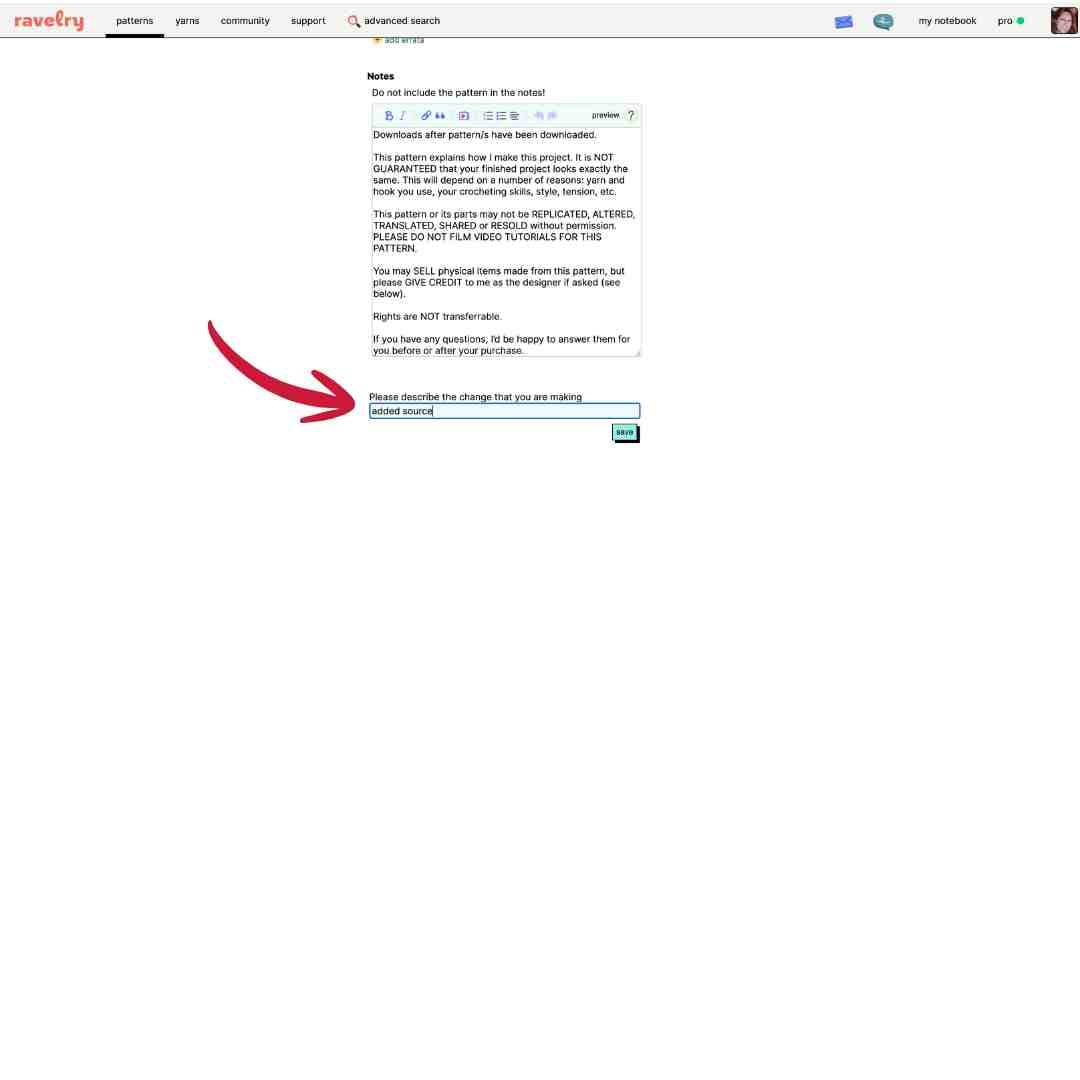
Repeat step # 2 for each pattern you’d like to include in your e-book.
Once finished, login to your PRO account
1. Click “Manage Store”.
2. Click on the drop-down arrow in the top left corner.
3. Choose the title of your new e-book.
4. Click “Add pattern to store”.

5. Choose currency & price for your e-book.
6. Upload your PDF. You can do this 3 ways:
- Combine the patterns for this e-book into a styled PDF on Canva,
- Create one word doc with the links to each pattern,
- Or you could simply add individual pattern PDFs here.
Save changes and activate product in the box on the right.
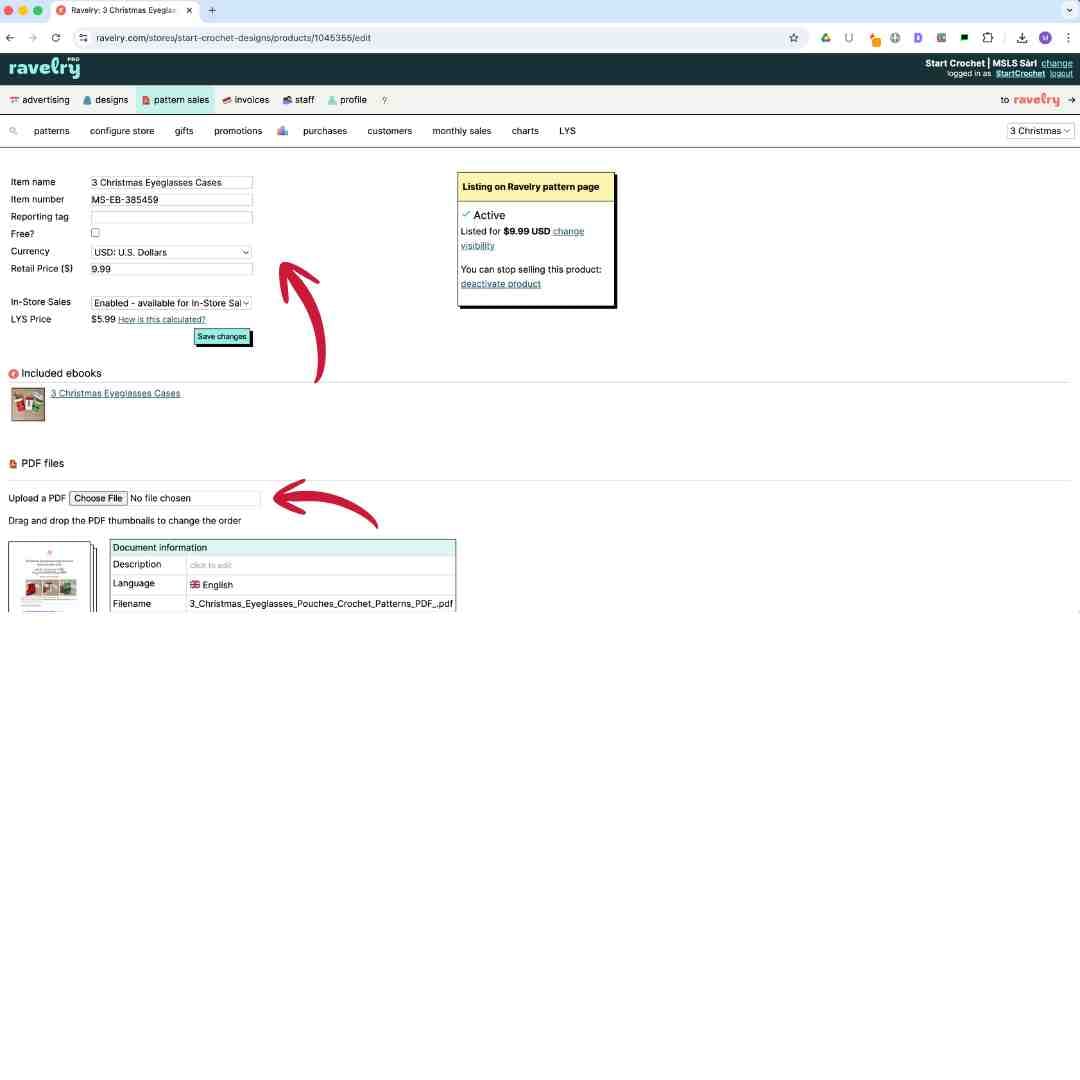
Once you've saved and activated this e-book, it's time to add a cover photo for it.
- Click on your "Patterns" page
- Click on "Included e-books"
- Click "Edit" on the top menu bar
- Add a cover photo for your e-book and any other information you'd like to include.
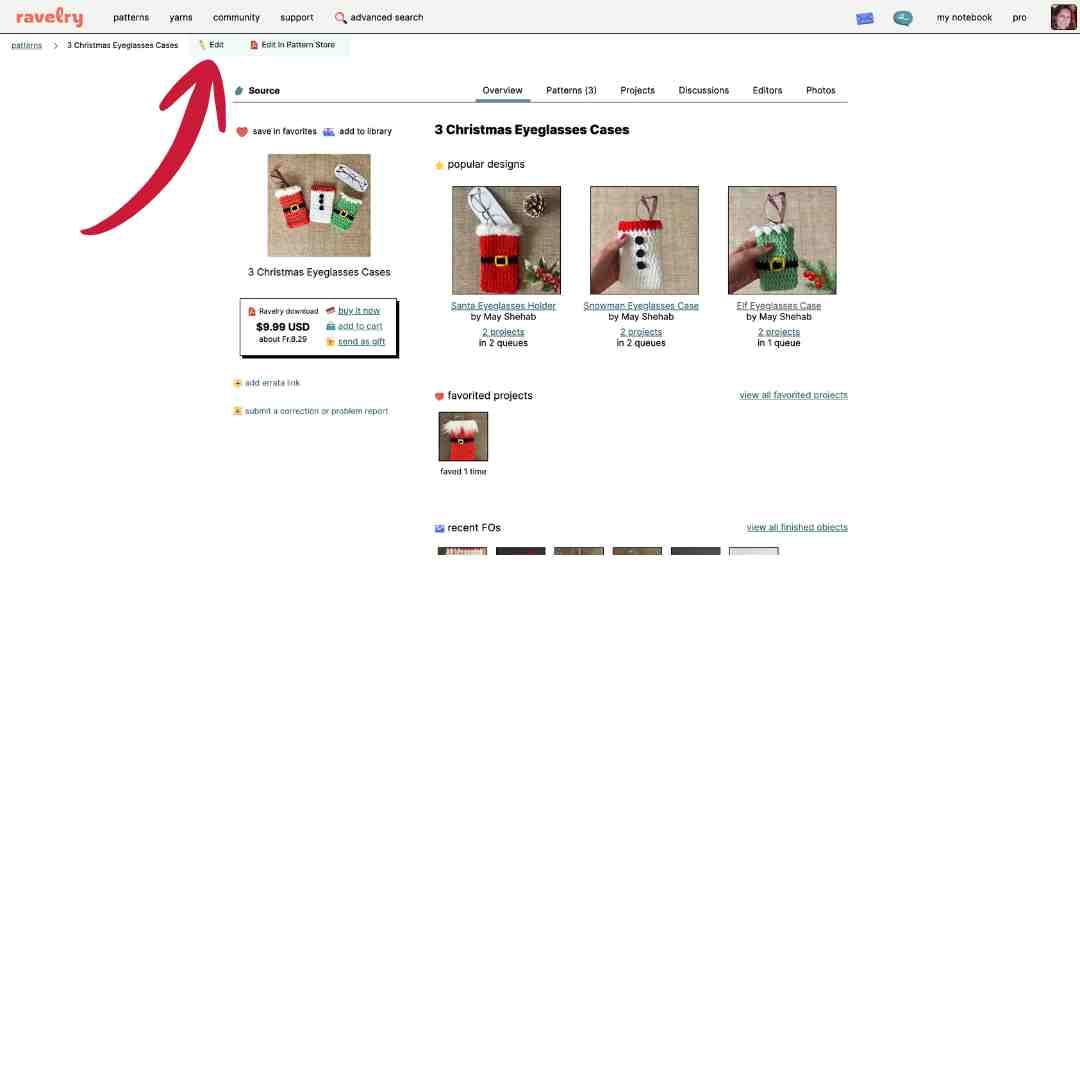

And that's it! You have now created your Crochet Pattern e-book! Congrats!!
Now you need to market your e-book so people can see it and potentially buy it. Copy the link to your Ravelry e-book and post it to all your social media and email list with some nice copy and a good photo. You could also make a video showcasing your ebook and post to TikTok, FB, IG reels or YouTube shorts.
Want to post to all your social media very quickly? Check out Blotato.
Here are some more marketing tips for your crochet patterns:

I hope you found this Ravelry tutorial helpful. Let me know if you have any questions in the comments below.
Enjoy and happy hooking!
May
Subscribe To My Designer Newsletter
Would you like me to send you more tutorials, templates, & helpful tips & tricks for new crochet designers? Please enter your Name & Email below 🙂
Want to learn more about crochet blogging and designing, join my designers' newsletter and check out these posts below:

Related Articles


Let's Keep in Touch :)
You May Also Like

About the Author
May
Follow me on socials here: